
Windows App
Updated:
June 29, 2024
Current Version:
1.7.33.3
Requires:
Windows 7/8/10/11
Windows Server 2008R2/12/16/19/22/25
Size:
18 MB
A Powerful, Cloud Based Drive Accessible from Anywhere!
OpenDrive is a service providing you with 5GB of free cloud storage to view, share, and collaborate on your documents.
Access your data from anywhere and from any connection. Upload new files or manage your existing ones. Manage folders and create and edit documents with our online office suite, all without installing any software.
OpenDrive for Windows also lets you share your files and folders with anyone through links. You can also create account users and manage their direct access to specific folders.
- Online Drive
- Upload, Create, Edit, Replace, Move and Preview Files
- Syncing of Selected Files and Folders Across Multiple Computers
- Automated Backup
- Sync and Backup Scheduling with Email Notifications
- Play Music and Videos
- Upload New File Versions
- Create Folders and Subfolders
- Zero Knowledge Encryption Folder (AES-256 File Encryption with a Custom Key)
- Public, Hidden and Private Permission Assignment for Each File and Folder
- Share Files and Folders
- Search Files and Folders
- Trash and Restore Files and Folders
- De-duplication
1.7.33 (Jun 26, 2024)
- Resolve SSL conflict with HTTP3 in some instances
- Added ability to run .exe files from mounted drives
1.7.32 (Jun 4, 2024)
- Add ability to change location of log file
- Added ability to run .exe files from mounted drives
- Add ability to migrate settings and logs when installing the app on a new device
- Add ability to submit login details by pressing Enter
- Add ability to stream encrypted video files
- Add HTTP3 support
- Add ability to set default name for exporting files
- Added reboot tracking to log files
- Fixed several stability issues with Windows 11
- Other minor fixes and improvements
1.7.31 (Dec 22, 2023)
- Fixed issue when trying to import tasks from XML file.
- Added Restore option when creating a new task to make restoring easier
1.7.30 (Dec 6, 2023)
- Add ability to completely disable the upload cache in the application and for each separate task.
- Updated sqlite engine
- Improved stability
- Other minor fixes
1.7.29 (Oct 12, 2023)
- Fixed issue that caused the app to crash after some uploads
1.7.28 (Oct 11, 2023)
- Added feature to create a desktop shortcut
- Added ability to click To/From folder and open File Explorer
- Added function to attach logs to reports
- Added ability to disable pre-caching of files on local drive
- Improved log viewer
- Stopped task from pausing when editing
- Other minor improvements
1.7.27 (Jun 21, 2023)
- Added feature to restore backup from a point in time.
- Added ability to change KB/sec and MB/sec to Kbps and Mbps
- Fixed bug where download and upload speeds showed in KB/sec instead of MB/sec
- Improved local logging capabilities
- Fixed bug with file notification emails in some instances
- Fixed but with modified date that is shown in the Properties window
- Fixed bug preventing deleting a task created for a removable device
1.7.26 (Feb 24, 2023)
- Fixed issue with Copy and Paste in File Explorer.
- Force files deleted when moving to be moved to the Trash folder
- Fixed minor issues with properties of deleted items in the Trash folder
- Fixed error when moving folder to local computer if the file already exists locally
- Fixed issue when opening properties of two or more items in the trash that caused slow response
1.7.25 (Jan 18, 2023)
- Fixed issue with app freezing under specific conditions
- Improved error reporting
1.7.22 (Dec 22, 2022)
- Fixed issue with file link remaining the same after name change
- Fixed issue with occasional crash if incorrect response received
- Updated status in a backup/sync completes but has errors
- Added clarity to the actual speed vs average speed
1.7.21 (Dec 8, 2022)
- Added feature to show which folder is being processed during sync comparisons
- Added feature to show current and average speeds
- Added logging for task pause/resume of tasks
- Added ability to save task options as default for new tasks
- Added a file lock so files cannot be saved while they are being downloaded
- Fixed other minor issues
1.7.20 (Oct 8, 2022)
- Added ability to set task destination for networked drive to root
- Added more detail in logs
- Improved function of Sync with multiple versions
- Fixed issue with task pause feature not working on multiple tasks
- Fixed issue with occasional crash during upload on Windows 11
- Fixed issue with rename in some instances
1.7.19 (Jul 8, 2022)
- Added speed meter for file transfers
- Added function for settings to be remembered for the next backup/sync session
- Optimized to increase upload speed of larger files
- Optimized RAM to use disk instead of memory for large buffers
- Optimized GUI to update faster when multiple tasks are running simultaneously
1.7.18 (May 17, 2022)
- Added logging when PC sleeps while a task is running.
- Added ability to use SyncService with 2FA
- Added ‘Process only newer files’ option for Sync Tasks
- Fixed issue with Media Backup
- Fixed issue with copy and paste in File Explorer
1.7.17 (Apr 8, 2022)
- Added option to ignore files older than x in tasks.
- Added additional checks for file comparisons during sync & backup tasks
- Changed hourly tasks to run at various times
- Improved uploads to be more efficient
- Fixed issue with CPU usage sometimes spiking after closing the app
- Fixed issue with how some file properties data was displayed
1.7.16.3 (Jan 25, 2022)
- Added ability to disable file upload notifications to admin email address
- Fixed issue causing errors during upload in rare cases
- Fixed issue of some files not being deleted after move
1.7.15.1 (Jan 25, 2022)
- Fixed issue preventing upgrade for some older versions of Windows.
1.7.14.9 (Jan 24, 2022)
- Update for resellers branding
- Replaced OpenSSL for encryption
- Minor bug fixes and stability improvements
1.7.13.6 (Oct 29, 2021)
- Fixed issue of error “The cloud provider is not running” under certain circumstances
- Fixed issue of temp path being set incorrectly in some cases
- Fixed conflict if 2 local folders are mapped to the same OpenDrive folder
- Fixed conflict if simultaneous tasks with 2 sub folders with the same name are contained in 2 parent folders are run
- Fixed issue of “other errors” not being listed in the task log summary even if it is there in the log
- Fixed issue of drag and drop & copy and paste where sometimes the file would not appear in the folder after upload completed
- Add option to allow user to set “item locked” and “access denied” to local files as a warning instead of an error.
1.7.12.5 (Sep 10, 2021)
- Fixed issue of App crash under certain circumstances when updating
- Fixed issue of some files uploaded long back having an error when being decompressed
- Clarified instructions for setting up the initial password for the Secure folder
1.7.11.10 (Aug 9, 2021)
- Add ability to differentiate file and folders when setting include and exclude filters
- Add ability to backup sub-trees of a folder without backing up files from that folder
- Improved file timeout calculations based on file size
- Improved auto-handling of errors during backup and sync tasks so they are more reliable
1.7.10.2 (June 8, 2021)
- Fixed issue of logs becoming too large when downloading many large files
- Fixed issue of files being copied from OpenDrive to a local folder not replacing the local item
1.7.9.11 (May 28, 2021)
- Added option for Sync tasks to exclude junctions, hardlinks and sym links
- Improved handling of copy/move of folders inside OpenDrive
- Improved multi-window drag and drop to work better with Secure folders
- Changing max simultaneous operations no longer stops the task
- Fixed issues with embedded uninstall function
- Added measures to ensure smoother installation
- Added additional logging
- Other minor bugs fixes and stability improvements
1.7.8.5 (February 23, 2021)
- Signatures are signed in only SHA256 so support for Windows Vista ended
- Improved handling of saves to prevent saving empty files in rare conditions
- Fixed issue with deleting multiple files affecting Windows 2008 only
- Fixed issue preventing files in the cloud from being attached to email messages
1.7.7.1 (December 18, 2020)
- Improved handling of file names using special characters
- Improved handling of file names using accented characters
- Fixed issue when occasionally a file that hasn’t changed would be reuploaded during sync/backup
1.7.6.6 (December 2, 2020)
- Improved upload progress bar to be more accurate showing caching vs uploads
- Improved response time when browsing folders
- Added option for Forgot Password
- Added data of the last start to log file
- Updated wording shown when an open file is skipped during backup/Sync
- Fixed issue with the last location not being remembered
- Fixed issue causing errors in specific instances
1.7.5.5 (September 3, 2020)
- Added option for tasks that are stopped to allow jobs in process to complete
- Simplified controls to allow screen readers to better read options
- Fixed issue with Backups running past cut off hours
- Fixed issue with task date showing incorrect year on specific occasions
- Fixed issue with new file Properties not always showing details
- Fixed issue with sending report if file is too large
- Fixed issue with opening file in OpenDrive directly from Excel’s File menu
1.7.4.58 (May 21, 2020)
- Added more log details if a Sync/Backup task is stopped
- Fixed issue with Keep Alive which speeds upload times
- Fixed issue of not all files may mirror properly in one-way sync
1.7.4.56 (April 28, 2020)
- Improved logging so log file does not grow too large
- Fixed issue where app could freeze if IP v6 was used
- Fixed issue of not all files may mirror properly in one-way sync
- Fixed issue of file downloading indefinitely if it is damaged or incomplete
- Fixed issue of installer not properly closing/restarting Explorer.exe
- Fixed issue of installer opening several File Explorer windows after install
1.7.4.49 (March 19, 2020)
- Added support for 2-Factor Authentication when it is released shortly
- Changed function for Tray app to run during uninstall
- Changed Task Wizard so that it does not lock the Explorer Window
- Fixed issue with some deleted folders being automatically restored
- Fixed issue with Auto-Login not working after reboot
- Fixed issue with sometimes getting an error when accessing a shared folder
- Fixed issue with Windows App Update not launching in all cases
1.7.4.41 (January 29, 2020)
- Added ability to set full folder permissions by right clicking on folder and select Properties
- Added ability see how long a file was uploaded/downloaded in a sync/backup task
- Added option to open OpenDrive App after installation completes and prompt new users to set up a new backup/sync
- Fixed issue where two instances of Opendrive can be started
- Fixed issue with “include” filter in a task ignoring root folder
- Improved stability in specific rare conditions
1.7.4.35 (December 5, 2019)
- Added ability to hide OpenDrive root folder to prevent Read-Only Win users from accessing files being backed up by Admin
- Added ability to set the End Time for backups using the Sync Service tool
- Fixed temporary links for increased lifetime for playlists of Stream All Music/Video
- Fixed issue with Reverse Backup logging
- Improved error handling and stability
1.7.4.31 (November 14, 2019)
- Added ability to choose program if default handler is not available
- Fixed random crashing related to media files
- Fixed issue related to WinAmp being used as default media player
1.7.4.28 (November 4, 2019)
- Added ability to give custom names to tasks in Sync Service
- Added compatibility with Windows Vista
- Added option to allow users to choose how to open media files
- Fixed issue of task stopping if error log could not be written to
- Fixed issue of being unable to save Office files directly to cloud storage.
1.7.4.23 (October 7, 2019)
- Fixed issue of error during installation in rare cases
- Fixed issue of Explorer.exe using too much memory
- Fixed issue file filter not working in Sync Service
- Fixed issue of false network error that appeared in rare cases.
- Improved Stability
1.7.4.15 (August 30, 2019)
- Fixed issue of AAC music files not being backed up
- Fixed issue of Paint being used to open images even if another default app is set
- Fixed issue of an error when a new user tries to register in certain circumstances
- Fixed issue of the ‘Sync Service’ not being able to use disk root in the source field in Windows Server.
1.7.4.12 (July 25, 2019)
- Fixed issue of some office files not saving properly
- Fixed issue of application window not closing when an upload is canceled
- Fixed issue of application crash when trying to access folders without logging in
- Fixed issue with overwriting tasks causing app to close.
1.7.4.9 (June 26, 2019)
- Fixed issue of incompatibility after upgrading to Windows version 1903
- Fixed issue of copy & paste not working consistently
- Fixed issue where application key when pressed in a folder would not given the option box for actions
- Fixed resources not being released after closing Properties window issue
1.7.4.7 (June 3, 2019)
- Fixed issue of some users getting encryption key required message
- Fixed issue of not being able to assign mass permissions to files and folders at the same time
1.7.4.6 (May 21, 2019)
- Added new task type for constant change tracking for sync.
- Add more information about tasks to log files
- Add ability to reverse backup on an incomplete task
- Add feature to display file links in the Links tab of folder properties
- Add popup to tray icon to show which user is logged in
- Fix issue affecting some users encrypted files being able to be browsed properly
- Fix issue with tasks not always resuming automatically
- Fix issue with task override
- Other minor stability improvements and fixes
1.7.3.28 (March 6, 2019)
- Add auto-retry for any files not uploaded successfully
- Add faster opening for folders containing a large number of items
- Add faster moving of folders within OpenDrive storage
1.7.3.23 (February 13, 2019)
- Add showing Sync and Backup Manager in Windows File Explorer
- Add more options for hidden tasks
- Fix issue for setup not showing “This PC” option when too many icons on desktop
- Fix issue for not getting email notifications under all conditions
- Fix issue of high memory usage in some circumstances
- Optimize shell extension
- Other minor stability improvements and fixes
Application Screenshots
-
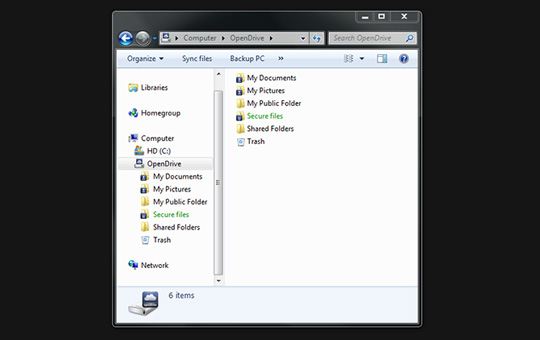 Familiar folder structure
 -
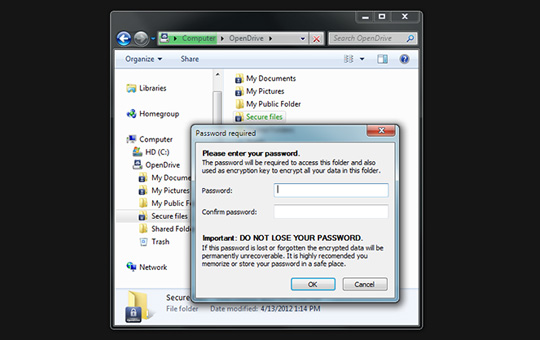 Zero knowledge encryption
 -
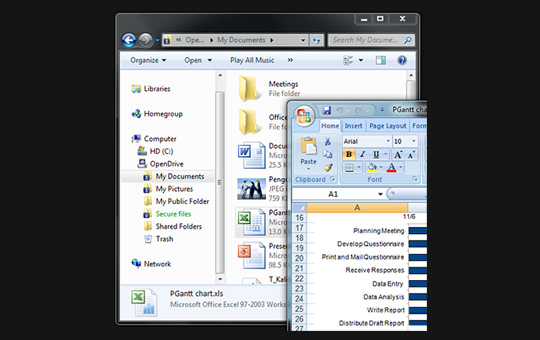 Online file editing
 -
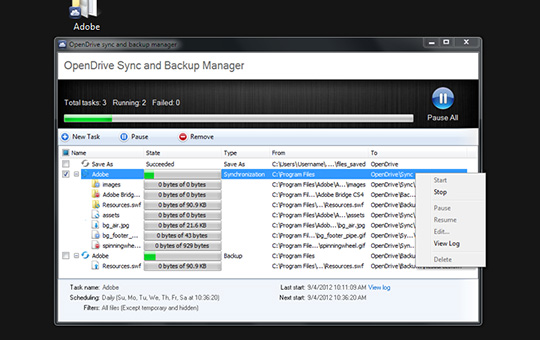 Sync and backup manager